Telegram QR Login: Passwordless Auth in 40 Lines of Code
Most auth options boil down to two flavors: manage passwords yourself (hashing, resets, breach anxiety) or bolt on an OAuth provider (client IDs, redirect URIs, SDK bloat). Neither feels lightweight.
What if your users could just scan a QR code with Telegram, tap confirm, and they're in? No OAuth provider. No email loop. No third-party dependencies beyond Telegram itself, which is probably already on their phone.
That's what Telebun does — @luckywirasakti/telebun on npm. ~500 lines of TypeScript, one dependency, and about 40 lines of integration code.
The Flow
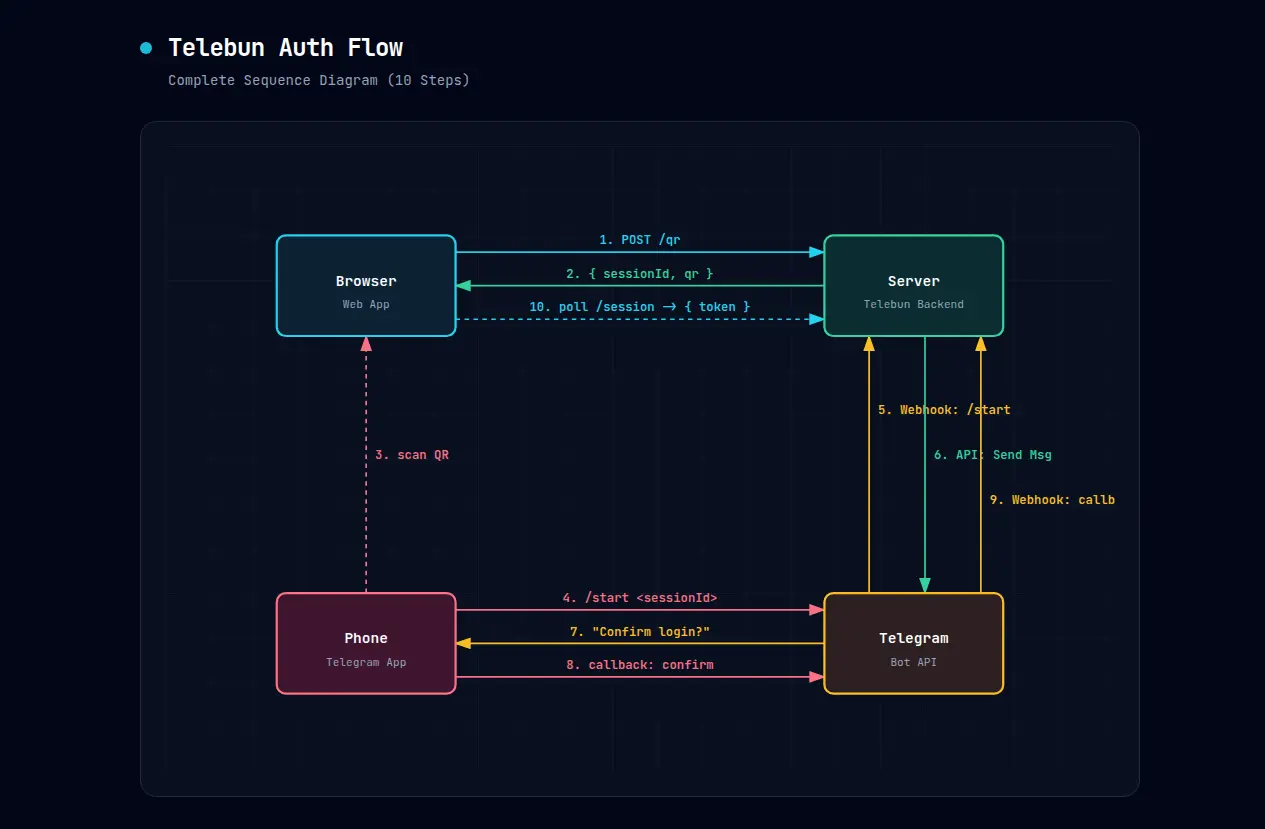
No redirects. No popups. No "check your inbox."
QR Generation
Server generates a random session ID, stuffs it into a Telegram deep link, renders a QR:
const sessionId = randomBytes(24).toString('hex');
const deepLink = `https://t.me/${botUsername}?start=${sessionId}`;
const qrDataUrl = await QRCode.toDataURL(deepLink, { width: 400, margin: 2 });
The session ID is 24 random bytes as hex — opaque, no secrets, no claims. Scanning the QR on mobile opens Telegram straight to the bot. Sessions expire after 5 minutes.
The Bot
Scan triggers /start <sessionId>. The handler verifies the session, then asks the user to confirm with an inline button:
"Sign in to Dashboard?"
[ ✅ Confirm Login ]
That tap is the difference between "scan to log in" and "scan to be silently authenticated on someone else's behalf." WhatsApp Web, Discord, and Telegram's own login widget all have this for the same reason — it kills QR-phishing dead.
Confirm tap → callback_query → handler has session ID + Telegram user ID.
Signing the Handoff
The handler tells Telebun "this person confirmed" via HMAC-SHA256:
const signable = `${sessionId}|${userId}|${new Date().toISOString()}`;
const signature = createHmac('sha256', BOT_TOKEN).update(signable).digest('hex');
Telebun verifies with crypto.timingSafeEqual() — constant-time comparison that catches replays, tampered fields, and compromised handlers. The signing key defaults to the bot token (already shared between your server and Telegram).
Sessions & Polling
Three states: pending → verified → expired. Ships with MemoryStore (single server) and RedisStore (distributed). Same 5-method interface — bring your own Postgres or DynamoDB if you want.
Browser polls once a second, 60-second cap. When verified lands, server returns a bearer token. No WebSocket needed — it's a login page, not a chat app.
Integration
const auth = new Telebun({
  botToken: process.env.TELEGRAM_BOT_TOKEN,
  botUsername: 'YourBot',
  sessionTTL: 300,
});

app.post('/api/auth/qr', async (req, res) => {
  res.json(await auth.generate());
});

app.get('/api/auth/session/:id', async (req, res) => {
  const session = await auth.checkSession(req.params.id);
  if (session?.status === 'verified') {
    res.json({ status: 'verified', token: generateToken(session.user) });
  } else {
    res.json({ status: session?.status ?? 'expired' });
  }
});

app.post('/api/auth/tg/callback', telebunExpress(auth));
That's it. Bearer-first, Basic Auth fallback if you want dual login paths.
Lessons
- Confirmation button is mandatory. One tap prevents QR-phishing. Ship it.
timingSafeEqualis non-negotiable. One line closes the timing attack.- QR carries nothing sensitive. Opaque ID only. Screenshots should be worthless after 5 minutes.
- Poll, don't WebSocket. Login pages don't need persistent connections.
TL;DR
Telegram QR auth: simpler than OAuth, safer than passwords, runs on an app your users already have. npm install @luckywirasakti/telebun, create a bot via @BotFather, 40 lines of glue code.