Self-Hosting a Secure ngrok Alternative: FRP + Caddy with Short-Lived SSL over WebSockets
Public tunneling services are convenient but introduce third-party dependency and pricing models. Building a self-hosted alternative gives you full domain ownership, custom security, and automated SSL provisioning.
This guide outlines how to deploy a dynamic, multi-port tunneling service using FRP (Fast Reverse Proxy) and Caddy on a low-resource VPS. The configuration tunnels traffic securely via WebSockets (port 443) and utilizes Let’s Encrypt's 6-day short-lived certificates for temporary development environments.
The Infrastructure Flow
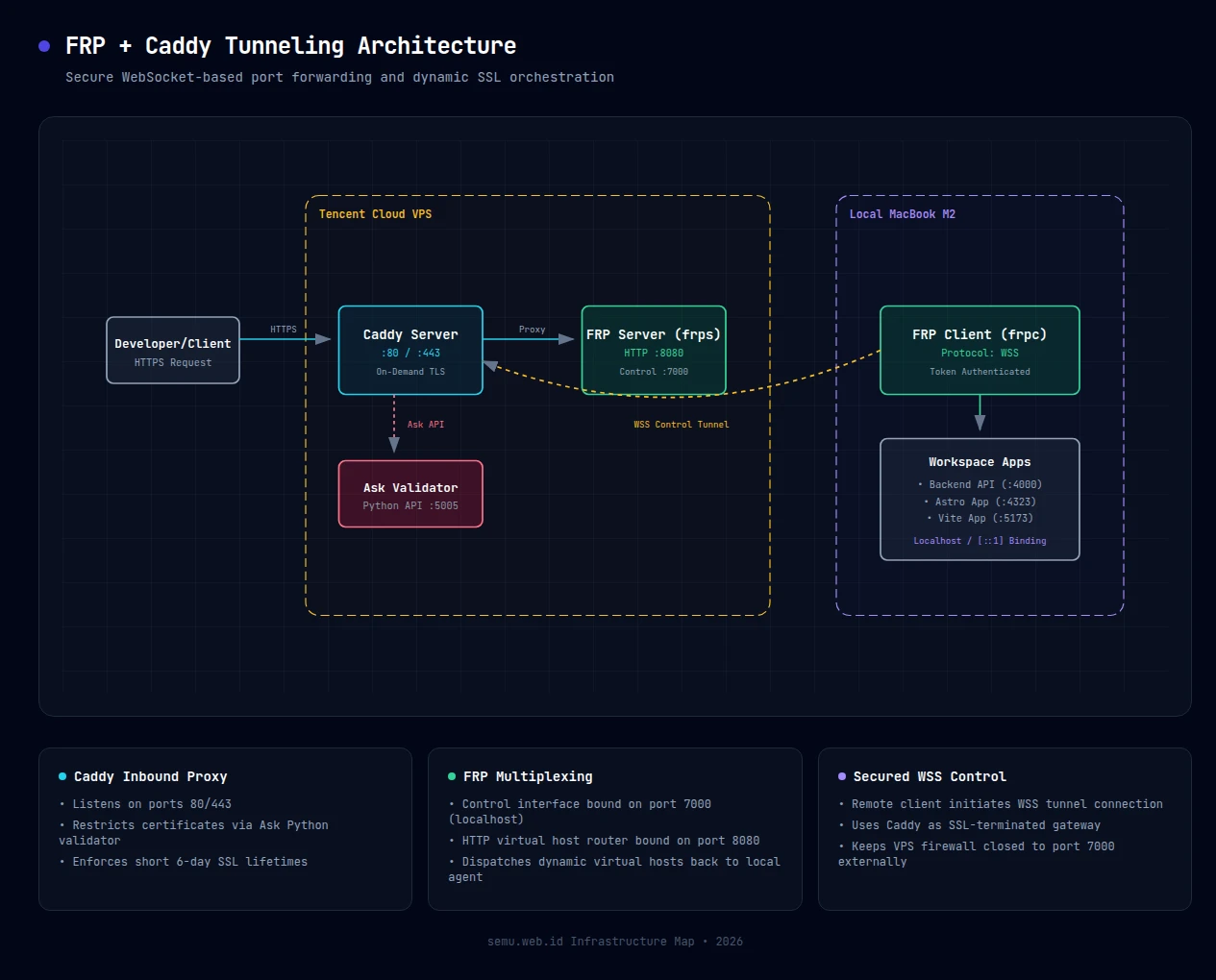
- Zero Exposed Ports: All tunneling traffic runs over HTTPS (port 443). Ports
7000(FRP control) and8080(FRP HTTP) remain closed to the public internet. - Auto-Provisioned SSL: Subdomains dynamically request valid Let's Encrypt certificates on-demand.
- Short-Lived Certificates: Development subdomains issue certificates valid for only 6 days (160 hours), keeping the server's certificate footprint clean.
- macOS Friendly: Built-in compatibility handling for local servers (like Vite/Astro) resolving on IPv6
[::1].
1. FRP Server Configuration (frps.toml)
Configure the FRP server on the VPS to bind to localhost. This ensures it is not reachable directly from the outside:
# /etc/frp/frps.toml
bindPort = 7000
vhostHTTPPort = 8080
subdomainHost = "semu.web.id"
custom404Page = "/etc/frp/404.html"
auth.method = "token"
auth.token = "your-secure-token"
2. Securing On-Demand TLS with a Validator
Caddy’s On-Demand TLS automatically provisions SSL certificates when a subdomain is first visited. To prevent certificate registration abuse, Caddy queries an ask endpoint.
This lightweight Python script runs as a background service (caddy-ask.service) to validate incoming handshake hosts:
# /usr/local/bin/ask_server.py
import http.server
import re
import urllib.parse

class Handler(http.server.BaseHTTPRequestHandler):
    def do_GET(self):
        query = urllib.parse.urlparse(self.path).query
        params = urllib.parse.parse_qs(query)
        domain = params.get("domain", [""])[0]

        # Only allow semu.web.id and its subdomains
        if re.match(r"^[a-zA-Z0-9\-]+\.semu\.web\.id$", domain) or domain == "semu.web.id":
            self.send_response(200)
            self.end_headers()
            self.wfile.write(b"OK")
        else:
            self.send_response(400)
            self.end_headers()
            self.wfile.write(b"REJECT")

    def log_message(self, format, *args):
        pass # Suppress logging overhead

if __name__ == "__main__":
    server = http.server.HTTPServer(("127.0.0.1", 5005), Handler)
    server.serve_forever()
3. Caddy Reverse Proxy & SSL Lifetimes
Update the Caddy configuration. The cert_lifetime 160h parameter forces Let's Encrypt to issue short-lived certificates for the wildcards. A dedicated host blocks handles the WebSocket connection for FRP:
# /etc/caddy/Caddyfile
{
    on_demand_tls {
        ask http://127.0.0.1:5005
    }
    cert_lifetime 160h # Limit validity to 6 days
}

# WebSocket bridge for frpc client control
tunnel.semu.web.id {
    reverse_proxy localhost:7000
}

# Dynamic HTTP Routing
https:// {
    tls {
        on_demand
    }
    reverse_proxy localhost:8080
}
4. FRP Client Configuration (frpc.toml)
Configure the client agent on your local machine.
Note: Since Node.js v17, frameworks like Vite or Astro bind to macOS localhost via IPv6 [::1]. Setting localIP = "localhost" maps this correctly without hitting connection refused errors.
# frpc.toml (Local machine)
serverAddr = "tunnel.semu.web.id"
serverPort = 443
transport.protocol = "wss" # Force WebSocket Secure
auth.method = "token"
auth.token = "your-secure-token"

[[proxies]]
name = "backend-api"
type = "http"
localIP = "127.0.0.1"
localPort = 4000
subdomain = "backend"

[[proxies]]
name = "frontend-admin"
type = "http"
localIP = "localhost" # Vite IPv6 compatibility
localPort = 5173
subdomain = "admin"
Start the local agent:
frpc -c frpc.toml
5. Custom Offline Page
When the local agent disconnects, FRP displays a default error page. Replace it with a clean dark-themed card pointing users back to your main site:
<!-- /etc/frp/404.html -->
<!DOCTYPE html>
<html lang="en">
<head>
    <meta charset="UTF-8">
    <meta name="viewport" content="width=device-width, initial-scale=1.0">
    <title>Tunnel Offline | semu.web.id</title>
    <style>
        :root {
            --bg-color: #0b0f17;
            --card-bg: #161b22;
            --card-border: #30363d;
            --text-primary: #f0f3f6;
            --text-secondary: #8b949e;
            --accent-blue: #4f46e5;
        }
        body {
            margin: 0; padding: 0;
            display: flex; justify-content: center; align-items: center;
            height: 100vh; background-color: var(--bg-color);
            color: var(--text-primary);
            font-family: -apple-system, BlinkMacSystemFont, "Segoe UI", sans-serif;
        }
        .card {
            background-color: var(--card-bg);
            border: 1px solid var(--card-border);
            border-radius: 12px; padding: 40px 30px;
            max-width: 400px; text-align: center;
        }
        .btn {
            display: inline-block; width: 100%; box-sizing: border-box;
            background-color: var(--accent-blue); color: #fff;
            padding: 12px 24px; border-radius: 6px;
            text-decoration: none; font-weight: 600;
        }
    </style>
</head>
<body>
    <div class="card">
        <h1>Connection Standby</h1>
        <p>The target environment is waiting for the local agent to connect. Once started, services will automatically resume.</p>
        <a href="https://luckywirasakti.web.id" class="btn">Visit Main Website</a>
    </div>
</body>
</html>