Building ZenFlow: React, Web Audio API, and Chrome Extension Architecture
Recently, I launched ZenFlow, an open-source Chrome extension that replaces the New Tab page with a Pomodoro timer and ambient soundscape mixer.
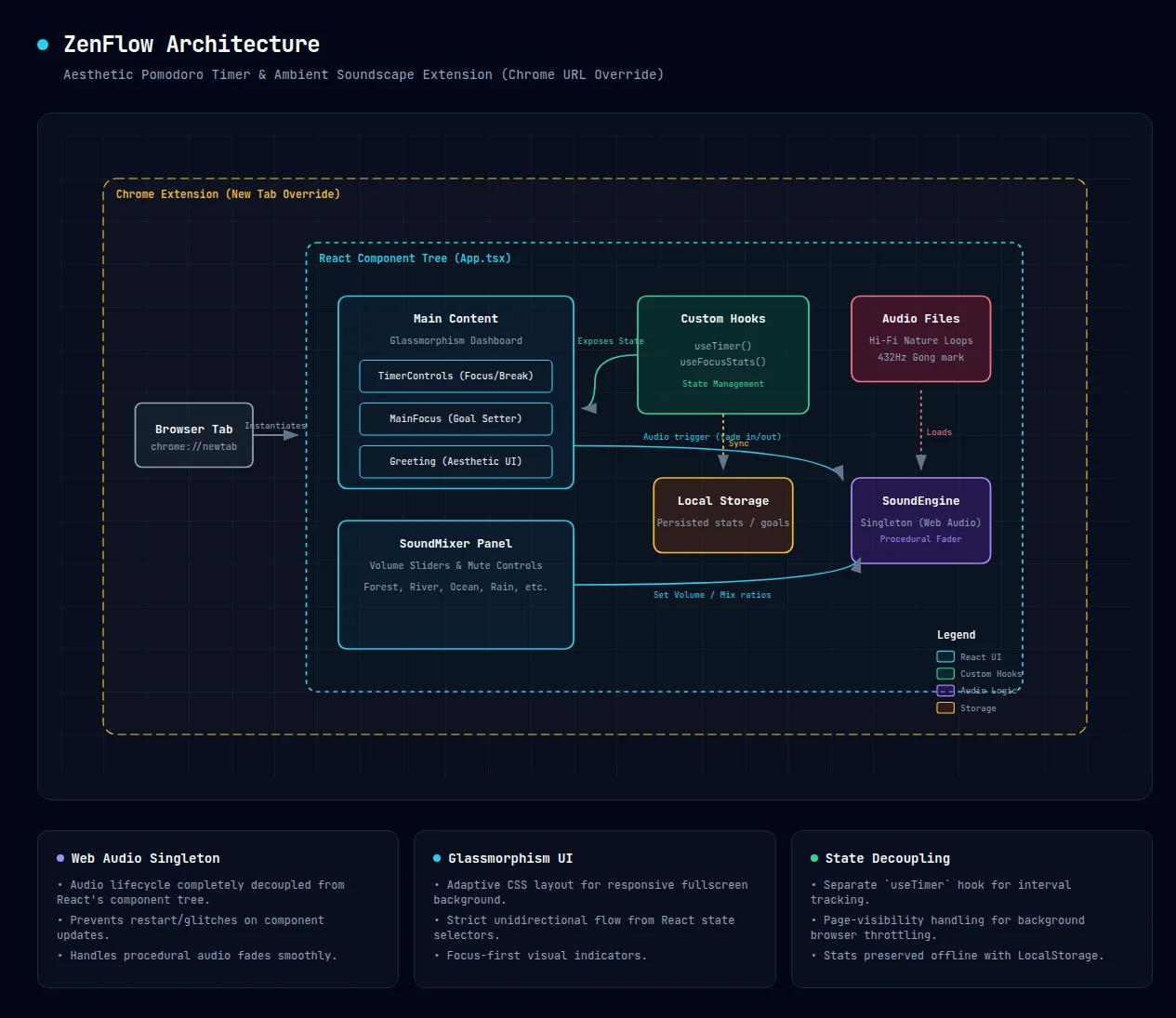
While the UI looks like a simple glassmorphism dashboard, building a reliable audio-heavy extension in React presented a few interesting architectural challenges. Here is a breakdown of how the system is structured.
1. The Web Audio Singleton Engine
The biggest risk in a React application dealing with media is tying audio playback to component lifecycles. If a component re-renders or unmounts unexpectedly, the audio might stutter, restart, or create overlapping ghost tracks.
To solve this, I built a custom SoundEngine singleton utilizing the native Web Audio API. This completely decouples the audio lifecycle from the React component tree.
Instead of using HTML <audio> tags scattered across components, the React app acts purely as a remote control. Components fire off commands (play, pause, fade, setVolume) to the SoundEngine. This architectural choice enabled smooth, procedural volume fading between Focus and Break states without relying on messy useEffect timing loops.
2. Strict Unidirectional Data Flow via Custom Hooks
To keep the visual components lightweight, I aggressively separated the domain logic from the UI using custom hooks.
useTimerencapsulates all the countdown logic, interval clearing, and state transitions (Focus → Short Break → Long Break).useFocusStatshandles the persistence layer, reading and writing daily deep work hours and tasks tolocalStorage.
The components (like the Timer Controls or the Sidebar Sound Mixer) only consume state and dispatch actions. They don't know how the timer works, only that they need to display the current seconds.
3. Developing Chrome Extensions with Vite
Modern frontend tooling has made extension development incredibly smooth. By configuring Vite to build into a specific directory and setting up a proper manifest.json using the chrome_url_overrides property, ZenFlow effortlessly takes over the chrome://newtab page.
During development, running npm run dev spun up a standard HMR environment in the browser, meaning 90% of the build process felt exactly like writing a standard web app before compiling it down for the extension package.
You can view the full architecture diagram and source code over at the ZenFlow GitHub Repository.